
Your FeruOTS character, in Discord.
OTCompanion is a Windows app and a Discord bot. The app reads your inventory, depot and stash from your game client; the bot brings them into Discord — with boss timers, monster & item lookups and hunt analysis.
- Read-only & safe
- One .exe, no install
- Free
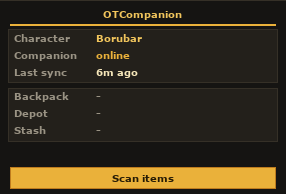
In your game client
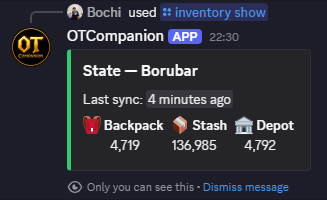
In your Discord
From game client to Discord in two minutes
Three steps, no config files. Pair once and it keeps itself in sync while you play.
Add the bot & pair
Invite the OTCompanion bot to your server, then run /inventory pair <character>. It DMs you a one-time code.
Run the companion
Launch OTCompanion alongside your client and paste the code. It detects your character automatically.
Play as usual
Your backpack, depot and stash appear in Discord and in the in-client dashboard — refreshed every few seconds while you play.
Everything your guild needs, in slash commands
One bot, any number of servers — each picks its own channel, schedule and timezone with /setup. No files to edit.
Boss-spawn pings
An alert a few minutes before every boss spawn, with a route map and the monster's stats. Per-server schedules, timezones and lead times.
Monster & item lookups
/monster and /item merge Tibia + FeruOTS wiki data — vulnerabilities, resists, attacks, loot tables and animated sprites.
Hunting-ground planner
/hunting-ground recommends which elements to attack with and resist across 500+ spots, weighted by spawn density.
Charm & bestiary routes
/charm-route ranks the best spots to farm charm points, including the 5-kill fast-track bestiary creatures.
Hunt session analysis
Paste a Hunt Analyser or Party Hunt log to compare it against your last session, or rank party damage & healing.
DJ & server utilities
A /dj YouTube player, a live member-count channel and auto-formatted session embeds — optional extras for your server.
A tiny app that mirrors your character to Discord
OTCompanion attaches to your running client, reads your character state, and pushes it to the bot — then shows it back to you in-game.
Read-only & safe
The companion only reads your character's data from memory — the same info already on your screen. It never automates play or touches the server.
Inventory, depot & stash sync
Equipped gear and open containers sync live; open the Cyclopedia Item Summary once and your full depot + stash sync too.
In-client overlay
An optional draggable OTCompanion button adds a live status panel right inside your client — character, sync time and item totals.
Multi-character
Pair as many characters as you like. The companion follows whichever one you're playing, detected from the window title.
One self-contained .exe
No .NET, no installer, no dependencies. Download a single file and run it next to your client.
Private, encrypted pairing
Pairing uses a one-time code; the token is stored only as a hash, and your local credentials are encrypted with Windows DPAPI.
A command for every question
A taste of the 40+ slash commands. Discord hides the admin ones unless you can use them.
Boss timers
/nextbossNext spawn with a live countdown/schedule listView your server's boss schedule/setup channelPick where pings get posted
Wiki lookups
/monster infoStats, vulns, attacks, loot + sprite/item infoStats, value, who drops it, NPCs/item dropsFull loot table for a monster
Hunt planning
/hunting-ground infoBest damage types & resists for a spot/charm-route topBest bestiary spots by charm points/h/charm-route fast-trackEvery 5-kill bestiary creature
Sessions & companion
/session-analysisCompare hunts; party DPS leaderboards/inventory pairLink a character to the companion/inventory showBackpack · stash · depot totals
Questions, answered
Which clients and servers work?
It's built for FeruOTS and works with OTClientV8-family clients (vanilla OTClient, Mehah and similar). The companion is Windows-only; the Discord bot works anywhere.
Do I need to install .NET or anything else?
No. The companion ships as a single self-contained .exe — download it and run it. The Discord bot needs nothing from you beyond an invite.
How does pairing work — is my data private?
Run /inventory pair to get a one-time code and paste it into the companion. The bot stores only a hash of the token, your local credentials are encrypted with Windows DPAPI, and /inventory only ever shows item totals — never names or IDs.
How much does it cost?
Nothing. Both the bot and the companion are free.
Bring your character into Discord
Add the bot, run the companion, done. It's free — and your guild gets boss timers and wiki lookups in the bargain.